
You know the feeling. It’s 7 PM, the office is quiet, and you’re still staring at your screen. You’ve crushed your spreadsheets for the day. Your VLOOKUPs are flawless, your pivot tables are a work of art. Yet, your inbox is an overflowing mess of client questions, team updates, and audit notes that still need to be written up. You’re an Excel wizard, so why are you always the last one to leave?
Here’s a thought you might not have considered: the biggest drain on your time isn’t the complexity of your financial models. It’s the speed of your fingers on the keyboard.
Accountants pride themselves on efficiency. We learn every shortcut and macro to shave seconds off our analysis. But we completely ignore the tool we use for every single email, report, and memo. Time management is consistently ranked as a top challenge for accounting professionals, and slow typing is the invisible anchor dragging down your productivity every single day.
This guide is here to change that. We’re going to treat typing not as a data-entry chore, but as the high-leverage time management skill it truly is. We’ll break down the WPM (Words Per Minute) benchmarks you should be aiming for, show you the real-world cost of slow typing, and give you practical steps to speed up. It’s time to get your keyboard skills on par with your analytical skills and finally get home on time.
What is a good typing speed?
Let’s get into the numbers. When we measure typing speed, we use Words Per Minute, or WPM. A “word” is standardized as five characters, including spaces, so it’s a consistent way to measure how quickly you can get text on the page.
While the average person clocks in around 40 WPM, that’s just not going to cut it in a profession that runs on documentation, communication, and deadlines. For accountants, who juggle complex reports, detailed client emails, and urgent internal memos, a much better target is 60-70 WPM. Hitting this range moves you from simply “keeping up” to being genuinely efficient. It’s the difference between struggling to document your thoughts and getting them down on paper without a second thought.
| Typing Speed (WPM) | Skill Level | What This Means for an Accountant |
|---|---|---|
| Below 40 WPM | Below Average | You might struggle to keep up with documentation during time-pressured exams like the CFE. Daily tasks like writing emails and memos take way longer, pulling you away from analytical work. This speed can create a constant feeling of being behind. |
| 40-60 WPM | Average | You’re on par with most professionals but have a huge opportunity to reclaim time. This is a common range for CPA candidates who could gain a competitive edge by improving. You get the job done, but it’s taking longer than it needs to. |
| 60-80 WPM | Proficient & Productive | You draft reports and respond to client emails quickly, giving you a clear advantage. This speed frees up more time for strategic thinking and cuts down on late nights. You’re in control of your communication, not the other way around. |
| 80+ WPM | Advanced | You are in the top tier of typists. This speed allows you to document findings almost as fast as you can think, a major asset in high-pressure roles and complex case writing. You’re not just efficient; you’re a communication powerhouse. |
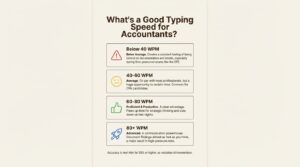
Of course, speed is useless without accuracy. In accounting, precision is everything. A typo in an email might be embarrassing, but a misplaced decimal in a report can be a disaster. If your accuracy rate is below 95%, you’re probably spending more time hitting the backspace key than you are moving forward. All the speed in the world won’t help if you’re constantly stopping to fix mistakes. It messes up your workflow, breaks your concentration, and ultimately slows you down.
Why typing speed matters beyond Excel
Every accountant has their favorite set of Excel shortcuts. “Ctrl + Arrow Key” to jump to the end of a data set, “Alt + E, S, V” to paste special values. These are the tools of our trade. They’re essential for navigating massive datasets and performing complex analysis. We spend hours mastering them because they make us faster and more effective.
But here’s the catch: how much of your day is actually spent only in Excel?
A huge chunk of an accountant’s time is dedicated to communication. You’re writing emails to explain findings to clients, drafting memos for management, documenting audit procedures, and collaborating with your team over chat. All that work happens outside the spreadsheet, and it’s where your Excel wizardry can’t help you.
Let’s put it into perspective with some hard numbers. Imagine you need to write a few detailed emails, totaling around 600 words. A proficient typist at 70 WPM can knock that out in about 8.5 minutes. But a slower typist pecking away at 20 WPM? That same task would take a full 30 minutes. That’s an extra 21.5 minutes spent on just one task. Now, multiply that by all the emails, reports, and notes you write in a single day.
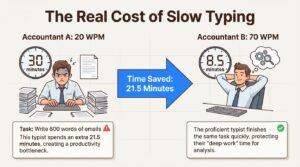
This is why you need to start thinking of typing speed as a foundational time management skill. Every time you switch from your spreadsheet to your inbox, slow typing creates friction. It’s a bottleneck that interrupts your flow. And those interruptions are costly. Research shows that it takes an average of 23 minutes to fully refocus after a significant distraction. By clearing your communication tasks quickly, you protect your “deep work” time: the focused hours you need for actual analysis and strategic thinking.
Strategies to boost your typing speed
The good news is that improving your typing speed isn’t about some innate talent; it’s a skill you can build with consistent practice. But as seasoned CPA coaches often say, you can’t cram for this. You can’t meaningfully improve your typing two weeks before the CFE; you have to start early and build the habit over time.
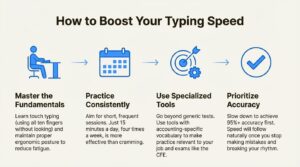
Here are four practical strategies to get you started.
Start with the fundamentals: Touch typing and posture
First things first, if you’re still using the “hunt-and-peck” method (looking at the keyboard and typing with two fingers), it’s time for an upgrade. The key to speed and efficiency is touch typing. This is the skill of typing without looking at the keyboard, using muscle memory for all ten fingers. Each finger has its own zone on the keyboard, and with practice, your hands learn to move to the right keys automatically. It feels slow and awkward at first, but it’s the only way to break through speed plateaus.
Just as important is your posture. Hunching over your desk isn’t just bad for your back; it also causes fatigue, which slows you down. Set yourself up for success with good ergonomics: sit up straight with your feet flat on the floor, keep your screen at eye level, and position your keyboard so your elbows are at a comfortable right angle with your wrists straight. This will help you type for longer periods without strain.
Make practice a consistent habit
You don’t need to spend hours a day practicing. In fact, you probably shouldn’t. Building muscle memory is all about consistency, not intensity. Short, frequent practice sessions are far more effective than one long, grueling session once a week.
Aim for 15 minutes a day, at least four times a week. That’s it. You can do it during your coffee break, before you start your workday, or while winding down in the evening. The goal is to make it a regular habit, just like brushing your teeth.
Focus on accuracy before pure speed
It feels counterintuitive, but the best way to type faster is to first slow down. When you’re first learning, it’s tempting to push for speed right away. But rushing leads to mistakes, and every time you hit the backspace key, you’re reinforcing bad habits and breaking your rhythm.
Your initial goal should be 95% accuracy or higher. Focus on hitting the right keys every single time, even if it feels painfully slow. Once you can type with high accuracy consistently, the speed will follow naturally. Correcting errors is a massive speed killer. It’s not just the time it takes to delete and retype; it’s the mental interruption that breaks your focus and kills your momentum. Slow down, get it right, and then speed up.
The career impact of a better typing speed
Let’s connect the dots. How does a faster typing speed translate into tangible career benefits for an accountant? It impacts everything from your certification exams to your long-term career trajectory.
For the CFE: The Common Final Examination (CFE) isn’t a typing test, but it is a thinking exam where you’re evaluated on case writing. The faster and more accurately you can type, the more time you have to think, plan your response, and articulate your complete analysis. In a time-crunched exam environment, being able to get your thoughts onto the page without friction is a huge advantage. It can easily be the difference between a shallow response and a comprehensive one, which directly impacts your chances of passing.
In the Workplace: Once you’re in the field, speed and efficiency are proxies for competence. When you can turn around reports quickly, respond to client inquiries promptly, and document your work clearly without delay, you build a reputation for being reliable and effective. This frees up your time and mental energy for higher-level work, the kind of strategic analysis and client advisory that gets you noticed. It also helps you manage your workload better, reducing the stress and burnout that 56% of accountants report experiencing. Managers give the most challenging (and rewarding) projects to the people who can handle them efficiently. Faster typing is a skill that demonstrates that capacity every single day.
Typing speed to professional efficiency
For too long, accountants have treated typing as a low-level administrative task. We’ve obsessed over optimizing our spreadsheets while ignoring the very tool we use to communicate our insights. It’s time to recognize typing for what it is: a high-leverage productivity skill that directly impacts your time, your stress levels, and your career progression.
Your Excel skills are vital, but neglecting the skill you use for every email, report, and memo is a massive missed opportunity. Improving your WPM is one of the quickest and most effective ways to reclaim your time, reduce after-hours work, and position yourself for success.
You know your go-to Excel shortcuts, but what’s your WPM? Find out where you stand. Take a typing test on CA Monk and see if your fingers are keeping up with your ambitions.
Frequently Asked Questions
Q.1 What is a good typing speed for an accountant?
A: For accountants, a good target is 60-70 Words Per Minute (WPM). While the average person types around 40 WPM, the higher speed is needed to efficiently handle the heavy volume of emails, reports, and documentation required in the profession without it eating into your analytical time.
Q.2 Why is typing speed important in addition to Excel skills?
A: While Excel skills are crucial for analysis, a significant portion of an accountant’s day is spent on communication—writing emails, memos, and audit notes. Slow typing in these tasks creates a bottleneck, taking time away from the deep-work analysis where your Excel skills shine. Fast typing clears these communication hurdles quickly.
Q.3 Should I prioritize accuracy or speed when typing?
A: Yes, absolutely. In accounting, precision is non-negotiable. Aim for at least 95% accuracy first. Constantly hitting backspace to fix errors breaks your rhythm and slows you down more than typing carefully at a slightly slower pace. Speed will naturally increase once your accuracy is solid.
Q.4 How does typing speed affect an accountant’s career growth?
A: A faster typing speed makes you more efficient, which builds a reputation for competence and reliability. It frees up your time to focus on higher-value strategic work, reduces burnout, and makes you a prime candidate for more challenging and rewarding projects that lead to promotions.
Q.5 What is the first step to improving typing speed?
A: The first step is to stop the “hunt-and-peck” method and learn touch typing—typing without looking at the keyboard using all ten fingers. Combine this with setting up an ergonomic workspace with good posture to avoid fatigue and build a solid foundation for speed and accuracy.