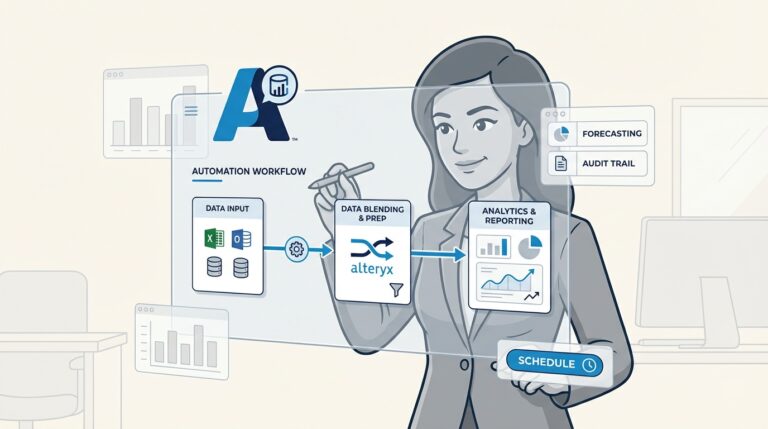
Many finance professionals have experienced the challenge of working with large datasets in Microsoft Excel. During critical times like a month-end close, a complex VLOOKUP can cause the program to freeze or stop responding. For decades, Excel has been an essential tool, but as data volumes grow, its limitations in handling performance on large datasets are becoming more apparent.
This challenge is driving a shift within top accounting and finance firms. The Big 4 are actively moving beyond traditional spreadsheets, seeking more robust solutions to manage modern data demands and reduce repetitive work.
A prominent solution in this space is Alteryx. It is an analytics automation platform designed to handle the scale, complexity, and repeatability required by modern finance departments.
In this guide, we’ll explore the reasons for this shift, examine the difference between one-off analysis and repeatable workflows, and show you some practical ways to use Alteryx to improve daily processes and advance your career.
What is Alteryx?
To understand why the industry is shifting, it’s important to know what Alteryx is and how it differs from traditional spreadsheets.
Alteryx is an analytics automation platform. It allows users to pull data from various sources, clean it, blend it, and analyze it using a visual, drag-and-drop interface. It is designed for building automated data processes rather than performing single calculations.
The core difference from Excel lies in its fundamental approach. While Excel is a spreadsheet application ideal for manual calculations and quick, one-off tasks, Alteryx is a workflow-based platform designed for building repeatable processes. Analysts often describe Excel as being for “ad-hoc analysis,” while Alteryx is for automation. Instead of manually importing data, Alteryx connects directly to over 80 data sources, such as ERPs, CRMs, and cloud databases. This eliminates the manual “export to CSV” step and helps maintain data integrity from the start.
A key advantage for finance professionals is that it does not require advanced coding skills. Its visual tools are intuitive for users familiar with financial logic, making it accessible for accountants, auditors, and analysts. The Alteryx One platform combines data preparation, analytics, and AI-powered insights in a governed environment to ensure security and consistency.
One-off analysis vs. repeatable workflows
The primary reason many finance teams are adopting automated analytics is repeatability. The following infographic breaks down the key differences between the manual, one-off approach common in spreadsheets and the automated, repeatable workflows possible with Alteryx.
The limitations of spreadsheets for repetitive tasks
While powerful, Excel’s design can present challenges for finance teams performing repetitive tasks.
- Manual and error-prone: Manual data entry and formula management can lead to errors. A single incorrect cell reference can affect an entire forecast, and without a clear audit trail, locating the source of the error can be difficult. This presents a risk when compliance is a factor.
- Lack of scalability: Excel has a row limit of 1,048,576 rows. For professionals working with large transactional datasets, this may not be sufficient. The program can also become slow or unresponsive with large files, impacting productivity.
- Fragile macros and lack of documentation: While VBA macros can automate tasks, they can be difficult to maintain. They are often poorly documented, hard for others to understand, and may break if the source data structure changes.
- Governance and control issues: Managing multiple versions of a file can be challenging. Excel has limited governance capabilities, which makes version control difficult and can increase the risk of manual errors.
How Alteryx automates repetitive finance tasks
Alteryx addresses these challenges by enabling users to build workflows instead of performing manual tasks. A workflow is a reusable, automated data process.
For example, consider a bank reconciliation.
- The workflow begins by connecting directly to the general ledger system and the location of the bank statement files, eliminating manual exports.
- Next, it uses drag-and-drop tools like the CLEANSING tool to automatically standardize date formats, remove extra spaces, and correct transaction descriptions without complex formulas like nested “IF” or “TRIM”.
- The workflow then joins the two datasets, identifying matching transactions based on user-defined rules, such as date, amount, and description.
- Finally, it separates the data into two outputs: a report of matched transactions and a report of exceptions that require manual review.
This “build once, run multiple times” approach offers significant efficiency. Once created, a workflow can be scheduled to run at any interval. Users have reported that Alteryx can reduce manual data prep time by up to 90%. Each step is visually documented within the workflow, which simplifies peer reviews, task handoffs, and provides the transparent, governed workflows often required by auditors.
Master Alteryx from scratch and fast-track your data analytics career—enroll now and start building powerful workflows today.
Key use cases for Alteryx in finance
Workflow automation can be applied in the day-to-day finance department life. It helps teams shift focus from data preparation to strategic analysis.
Transforming the audit and ensuring compliance
For auditors, Alteryx allows for more comprehensive testing. Instead of relying on small samples, you can now perform full population testing.
- Full population testing: Analyze 100% of a company’s journal entries or accounts payable transactions for an entire year. With Alteryx, this process can increase the accuracy of an audit and reduce risk.
- Automated reconciliations: Build workflows to automate fixed asset reconciliations, intercompany eliminations, and complex payroll reconciliations at a massive scale, freeing up time to focus on exceptions.
- Journal entry testing: Design workflows to automatically flag journal entries that meet certain criteria, like those posted on a weekend, entries for exact round numbers ($50,000.00), or those with unusual descriptions.
This is all supported by Alteryx’s governance and security features, which create a clear, defensible audit trail.
Enhancing financial planning & analysis (FP&A)
FP&A teams often consolidate data from multiple systems for budgets and forecasts. Alteryx can automate that process.
- Automated budgeting and forecasting: Build a workflow that automatically pulls actuals from your ERP, sales pipeline data from your CRM, and headcount data from HR to create a detailed budget without manual spreadsheet consolidation.
- Scenario modeling: To see how a 5% increase in material costs would affect the bottom line, you can adjust the variables in your workflow and get an answer in minutes instead of spending hours updating a model.
This allows FP&A teams to focus on providing strategic guidance. They can also build predictive models with AutoML to move from reporting to forecasting.
Improving tax and statutory reporting
Corporate tax often involves gathering and formatting data from different systems. This is the type of data wrangling Alteryx is designed to address.
- Data preparation for tax filings: Automate the process of collecting data from disparate sources, cleaning it, and formatting it for tax compliance software.
- Automated tax calculations: Use it to automate complex calculations like state apportionment or to manage and cleanse fixed asset data for tax depreciation calculations, ensuring accuracy and consistency.
Here’s a quick summary of how it all breaks down:
| Finance Function | Common Challenge in Excel | How Alteryx Helps |
|---|---|---|
| Auditing | Manual sampling and reconciliation; difficult to trace logic. | Automates testing of 100% of transactions; provides a visual, auditable workflow. |
| FP&A | Time-consuming data consolidation for budgets and forecasts. | Automates data blending and enables predictive modeling for faster, more accurate insights. |
| Tax | Labor-intensive data gathering from multiple, disconnected systems. | Cleans and blends data from any source to streamline tax compliance and reporting. |
| Accounting | Repetitive month-end close processes like accruals and consolidations. | Automates journal entries and consolidations, reducing close time and manual errors. |
Path to adopting Alteryx
So, how do you get started without feeling overwhelmed? The best approach is to think of it as a journey with a few clear stages.
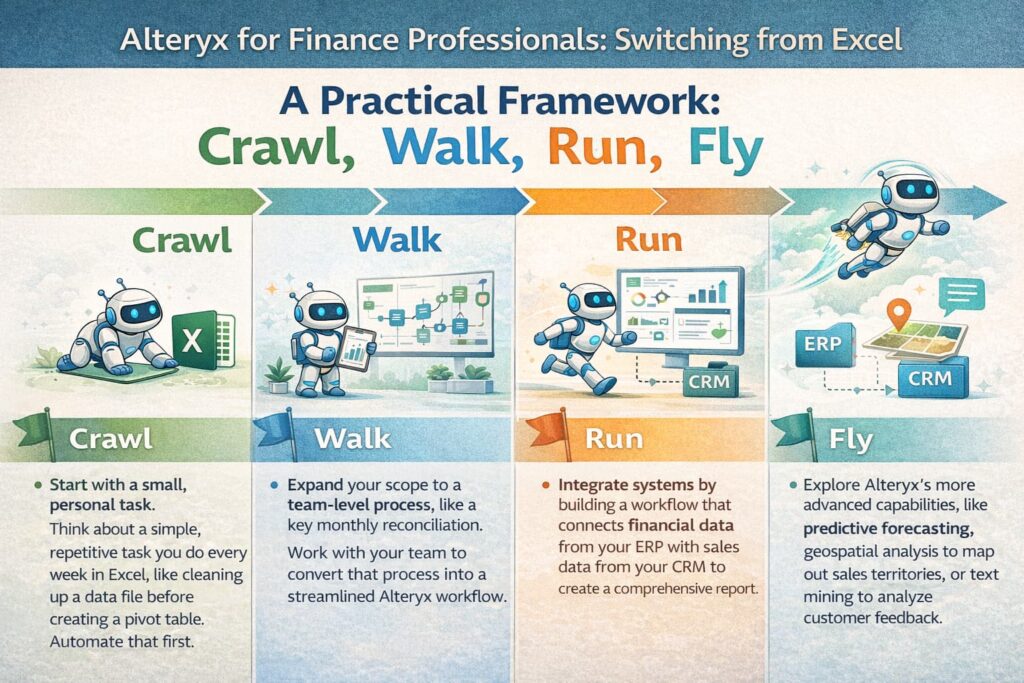
A practical framework: Crawl, walk, run, fly
- Crawl: Start with a small, personal task. Think about a simple, repetitive task you do every week in Excel, like cleaning up a data file before creating a pivot table. Automate that first.
- Walk: Expand your scope to a team-level process, like a key monthly reconciliation. Work with your team to convert that process into a streamlined Alteryx workflow.
- Run: Integrate systems by building a workflow that connects financial data from your ERP with sales data from your CRM to create a comprehensive report.
- Fly: Explore Alteryx’s more advanced capabilities, like predictive forecasting, geospatial analysis to map out sales territories, or text mining to analyze customer feedback.
What about pricing?
Alteryx is an enterprise tool, and its pricing reflects that. It is in a different category than a Microsoft 365 subscription.
- The Starter Edition for small teams is designed for basic analytics and working with flat files, starting at $250 USD per user, per month (billed annually).
- The Professional and Enterprise Editions unlock advanced data preparation tools, AI and machine learning capabilities, and connectors to virtually all data sources. For these, you’ll need to contact sales for a custom quote based on your team’s specific needs.
It’s a significant investment, designed for teams focused on generating a return through automation, governance, and deeper insights.
From analyst to advisor
Excel will continue to be a valuable tool for quick, ad-hoc analysis and simple tasks. However, for scalable and repeatable financial analysis, its limitations are notable. In a data-driven environment, dedicated analytics platforms are becoming increasingly important.
Adopting a tool like Alteryx can help change the role of the finance function. It can lead to increased accuracy, improved governance, and allow finance professionals to shift their focus from repetitive manual work to high-value strategic analysis.
Proficiency in tools like Alteryx is becoming a critical capability for anyone looking to advance their career in accounting and finance. These skills can help professionals transition from data processing roles to trusted business advisor roles that drive decisions.
Master Alteryx from scratch and fast-track your data analytics career—enroll now and start building powerful workflows today.
Also read: The remote CA in 2026: 5 Legitimate work-from-home profiles that pay global salaries
Frequently Asked Questions
Q.1 Why is Alteryx considered a better alternative to Excel for large datasets?
A1: Excel has a hard limit of just over one million rows and can become extremely slow or crash with large files. Alteryx is built to handle massive datasets from multiple sources without performance issues, making it far more reliable for serious data work.
Q.2 What are some common use cases of Alteryx in auditing?
A2: Auditors use Alteryx to perform full population testing instead of just sampling, automate complex reconciliations (like fixed assets or intercompany accounts), and build workflows to automatically flag suspicious journal entries based on specific criteria.
Q.3 How steep is the learning curve for someone starting with Alteryx?
A3: While there is a learning curve, Alteryx is known for its user-friendly, visual interface. Its drag-and-drop tools are intuitive for finance professionals who already think in logical steps, so you don’t need to be a coder to get started.
Q.4 Can Alteryx connect directly to our company’s ERP and CRM systems?
A4: Yes, one of its main strengths is its ability to connect to over 80 different data sources, including common ERPs, CRMs, cloud databases, and more. This eliminates the need for manual data exports.
Q.5 Is Alteryx only for large enterprises, or can smaller teams benefit too?
A5: Alteryx is used by large enterprises like the Big 4, but it also offers a Starter Edition designed for smaller teams. This version allows teams to begin automating their analytics with a more accessible entry point.
Q.6 How does implementing Alteryx help with compliance and audit trails?
A6: Every step of a data process in Alteryx is visually documented in the workflow itself. This creates a transparent, repeatable, and easily auditable trail that shows exactly how data was transformed, which is crucial for both internal governance and external audits.