
It’s 6:45 PM. You finished the testing hours ago. But the documentation? That’s what’s keeping you at your desk, typing out workpaper narratives and review note responses one slow keystroke at a time. Sound familiar?
Here’s something nobody talks about in audit: the speed at which you type directly determines when you leave the office. Not your technical skills. Not your efficiency at pulling samples. Your typing speed.
The documentation bottleneck
Audit work is typing work. Think about your average day: drafting emails to the client, documenting control walkthroughs, writing up testing conclusions, responding to review notes, building audit programs. It’s all keyboard time.
According to Typing.com research, finance workers spend more than 80% of their workday typing. Yet despite all that keyboard time, they average just under 50 WPM, making them some of the slowest typists in the workforce. The irony is painful.
Most CPA candidates type between 40 and 45 words per minute. If you came straight from studying for your exams into audit, that’s likely where you fall. It’s not bad, but it’s not doing you any favors either.
Here’s the math: at 40 WPM, documenting a single audit procedure that requires 500 words takes about 12.5 minutes of pure typing time. At 60 WPM, that same documentation takes just over 8 minutes. Four minutes doesn’t sound like much, but multiply that across dozens of procedures per day, every day of busy season, and the problem becomes clear.
The 40 WPM mark is what I call the inflection point. Below it, you’re fighting an uphill battle against the clock. Above it, time savings compound quickly enough to actually change when you leave.
What 40 WPM actually mean
Let’s get specific about what different typing speeds translate to in practice.
The professional baseline
Professional typing standards vary by industry. Wonderlic and HireBasis data put the baseline for office workers at 40-60 WPM. Legal professionals, who deal with heavy documentation demands similar to audit, average 60+ WPM. Finance and insurance workers? Just under 50 WPM, despite typing for most of their day.
The CPA candidate baseline of 40-45 WPM is functional, but it’s also the floor. You can get the work done. You just can’t get it done fast enough to leave on time.
Time savings at each speed tier
To make this concrete, let’s assume you type roughly 5,000 words per day. That’s a conservative estimate during busy season, when you’re cranking out documentation, client emails, and review note responses.
| Your WPM | Daily typing time (5,000 words) | Time vs. 40 WPM |
|---|---|---|
| 30 WPM | 167 minutes | +42 min slower |
| 40 WPM | 125 minutes | Baseline |
| 50 WPM | 100 minutes | 25 min saved |
| 60 WPM | 84 minutes | 41 min saved |
That 41-minute difference between 40 and 60 WPM is real time you get back. During a 12-hour busy season day, it’s the difference between leaving at 6:15 and leaving at 5:30. Over a week, that’s nearly 3.5 hours. Over a 16-week busy season, that’s more than 50 hours.
The work-life balance connection
There’s actual research connecting typing speed to work-life balance, and the findings are striking.
Typing.com surveyed 980 professionals across industries and tracked their typing speeds against their work habits. The results:
- Workers who never bring work home average 55.4 WPM
- Workers who bring work home 5+ nights per week average 49.8 WPM
That’s a 5.6 WPM difference between people who leave work at work and people who don’t.
The same study found that workers who take 45+ minute lunch breaks type at 54.5 WPM on average, while those who take 10 minutes or less average 49.3 WPM. Faster typists have time for real breaks.
The causality likely works in both directions. Faster typing enables earlier departure, which means better rest, which probably contributes to sustained performance. Slower typing keeps you at the office, which means less rest, which makes the next day harder.
For auditors, the implication is clear: typing speed isn’t just a skill. It’s a work-life balance lever. Faster typists finish their documentation during work hours. They have time for proper breaks. They don’t need to bring workpapers home to review over dinner.
Check and improve your typing speed with our Typing Test.
7 steps to improve your typing speed
The good news is that typing speed is a trainable skill. The methods are well-documented, and the timeline to improvement is shorter than you might expect.
Step 1: Establish your baseline
You can’t improve what you don’t measure. Take a free 1-minute typing test to find out where you actually stand. Most auditors overestimate their speed by 10-15 WPM.
Record both your speed and your accuracy. If you’re at 42 WPM with 94% accuracy, that’s your starting point. Knowing the real number removes the guesswork from improvement.
Step 2: Learn proper hand placement
The home row is your foundation. Left hand fingers on A, S, D, F. Right hand fingers on J, K, L, semicolon. Thumbs rest on the spacebar.
Most professionals use a hybrid hunt-and-peck method, using maybe 5-9 fingers and glancing at the keyboard frequently. This approach caps your speed at 40-50 WPM no matter how long you practice. Proper hand placement breaks through that ceiling.
Step 3: Stop looking at your keyboard
This is the single biggest speed unlock. Touch typing averages 54-61 WPM, while hunt-and-peck typing averages 39-54 WPM. The difference comes from eliminating the constant back-and-forth between screen and keyboard.
Force yourself to look only at the screen. It feels awkward at first. Your speed will temporarily drop. That’s normal. Within 2-3 weeks of consistent practice, your fingers learn where the keys are without visual confirmation.
Step 4: Prioritize accuracy over speed
Every source on typing improvement agrees on this: accuracy first, speed second. Aim for 98%+ accuracy before pushing for faster WPM.
Fast typists make fewer mistakes. That’s not intuitive, but it’s consistently true across studies. When you type accurately, you don’t waste time backspacing and retyping. The seconds saved on each word add up.
For auditors, this has a specific benefit: documentation errors create review notes. Fewer typing mistakes means fewer corrections, which means faster completion of workpapers and less time in review.
Step 5: Practice 10-15 minutes daily
Short, consistent sessions beat sporadic long ones. Research from Acessibilidade Legal shows that 10-15 minutes daily produces faster improvement than hour-long sessions once a week.
A suggested routine:
- 5 minutes warm-up: Simple sentences to get your fingers moving
- 5 minutes weak keys: Focus on the letters you consistently miss (for most people, it’s the numbers row and punctuation)
- 5 minutes sustained: Type a full paragraph without stopping, even if you make mistakes
For auditors, the best time is before work or during lunch. Ten minutes is low commitment, and you can do it at your desk without anyone noticing.
Step 6: Fix your posture
Ergonomics directly affect typing speed and your ability to sustain it over long hours.
The basics: feet flat on the floor, back straight, shoulders relaxed. Your keyboard should be at elbow height, with your wrists in a neutral position (not bent downward).
Better posture reduces fatigue and strain, which matters during a 14-hour busy season day. Less strain means longer typing sessions without the stiffness that slows you down by hour ten.
Step 7: Practice with real work content
Don’t just type random sentences from a practice website. Type actual audit-related content: draft emails to your client, control descriptions from the prior year file, finding summaries you need to write anyway.
This builds speed for your specific vocabulary. Technical accounting terms, client names, system acronyms. The words you type every day are the words you should practice. When “substantive testing procedures” flows from your fingers without conscious thought, you’ve made real progress.
Expected improvement timeline
Let’s set realistic expectations for what’s achievable, especially if you’re trying to improve during busy season.
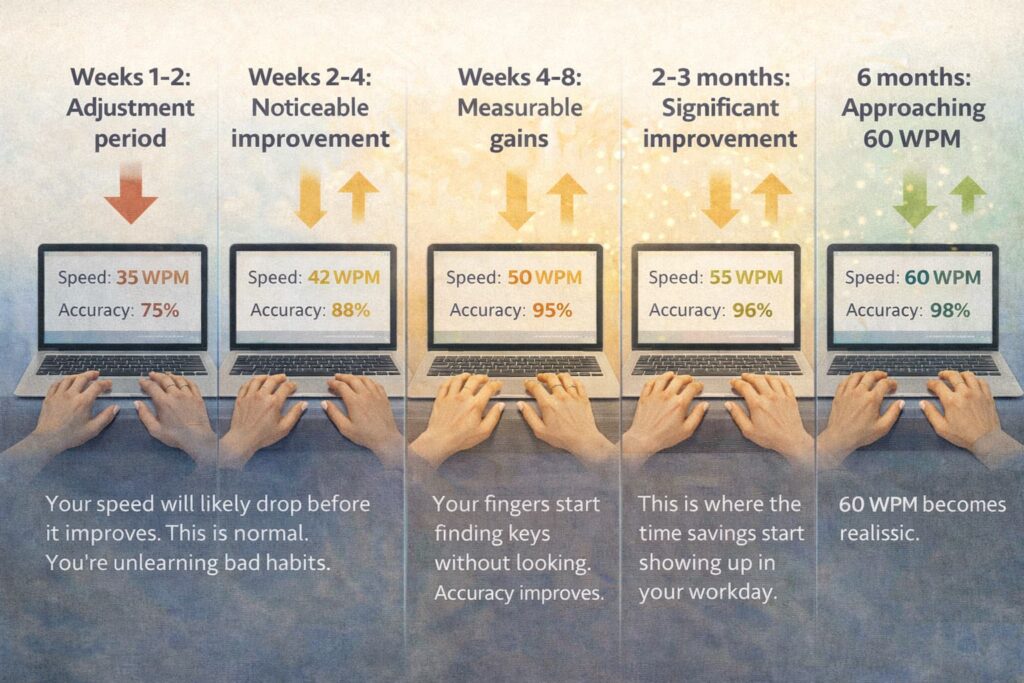
Based on research across multiple sources, a typical improvement timeline looks like this:
- Weeks 1-2: Adjustment period. If you’re switching to touch typing, your speed will likely drop before it improves. This is normal. You’re unlearning bad habits.
- Weeks 2-4: Noticeable improvement begins. Your fingers start finding keys without looking. Accuracy improves.
- Weeks 4-8: Measurable gains of 5-10 WPM. This is where the time savings start showing up in your workday.
- 2-3 months: Significant improvement. Moving from 40 WPM to 50 WPM is achievable with consistent practice.
- 6 months: Approaching 60 WPM becomes realistic.
The busy season math works in your favor here. A 12-16 week busy season is actually enough time to see real improvement. If you practice 10 minutes daily, that’s 70 minutes per week of dedicated typing practice. By the end of busy season, you could be 5-10 WPM faster.
That translates to 15-30 minutes saved daily on documentation. Compounded over the remaining weeks of busy season, you’re looking at hours reclaimed.
The target isn’t 90 WPM. You don’t need to become a transcriptionist. Getting from 40 to 60 WPM is achievable for most people and delivers the bulk of the time-saving benefit. That’s the practical goal.
Start typing faster today
What we’ve covered:
- 40 WPM is the inflection point where time savings become meaningful
- 60 WPM is the target for audit professionals who want to leave on time
- 10 minutes of daily practice for 4-8 weeks yields measurable results
- The outcome isn’t abstract productivity, it’s getting out of the office earlier
The data is clear. Workers who type faster don’t bring work home. They take real lunch breaks. They leave when the work is done, not when their typing catches up to their thinking.
Your next step is simple. Test your current speed to establish your baseline. Be honest about where you fall. Then commit to 10 minutes of practice daily. Not 30 minutes twice a week. Ten minutes every day, before work or during lunch.
In 4-8 weeks, you’ll notice the difference. Documentation that used to take an hour will take 45 minutes. Emails will flow faster. Review note responses won’t pile up the way they used to.
Typing speed isn’t about impressing anyone. It’s about finishing your documentation, closing your laptop, and going home.
Check and improve your typing speed with our Typing Test.
Also read: How to explain career gaps: A practical guide for women returners in 2026
Frequently Asked Questions
Q.1 What is a good typing speed for auditors?
A1: A good typing speed for auditors is 50-60 WPM. Most CPA candidates and entry-level auditors type 40-45 WPM, which is functional but leaves time on the table. Reaching 60 WPM puts you in the professional range and can save 30-45 minutes daily on documentation.
Q.2 How does typing speed for auditors affect work-life balance?
A2: Research shows workers who never bring work home average 55.4 WPM, while those working 5+ nights weekly average 49.8 WPM. For auditors, faster typing means finishing documentation during work hours instead of staying late or bringing workpapers home.
Q.3 Can auditors improve their typing speed during busy season?
A3: Yes. A 12-16 week busy season is enough time to see real improvement in typing speed for auditors. With 10 minutes of daily practice, most auditors can gain 5-10 WPM over busy season, translating to 15-30 minutes saved daily on documentation work.
Q.4 What is the minimum typing speed for auditors to work efficiently?
A4: The minimum typing speed for auditors to work efficiently is 40 WPM, which is where time savings begin compounding. Below 40 WPM, documentation tasks take significantly longer. Above 40 WPM, each additional 10 WPM saves roughly 15-20 minutes daily.
Q.5 How long does it take to improve typing speed for auditors?
A5: With consistent practice, auditors can expect noticeable improvement in typing speed within 2-4 weeks. Meaningful gains of 5-10 WPM typically appear after 4-8 weeks. Moving from 40 to 50 WPM is achievable within 2-3 months of daily 10-15 minute practice sessions.
Q.6 Why is typing speed for auditors rarely discussed in training?
A6: Typing speed for auditors is overlooked because firms focus on technical accounting skills and software proficiency. Yet auditors spend 80%+ of their day typing documentation and emails. Improving this foundational skill delivers immediate productivity gains that compound over entire careers.
Q.7 What typing speed for auditors is needed to leave work on time?
A7: To leave work on time consistently, auditors should target 60 WPM. At this typing speed, auditors save approximately 41 minutes daily compared to the 40 WPM baseline. Over a typical busy season, that adds up to more than 50 hours of reclaimed time.