
Here’s a scenario that might sound familiar. You’ve spent years acing exams, pulling all-nighters, and mastering the complexities of finance. You’re a qualified Chartered Accountant or a sharp articleship candidate, ready for the next big step. So you polish your resume, hit “apply” on dozens of job postings, and then… silence. It feels like your applications are just vanishing into a digital black hole.
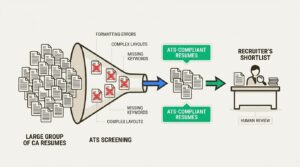
If this is hitting a little too close to home, you’re not alone. The problem probably isn’t you; it’s the automated gatekeeper you have to get past first. Meet the Applicant Tracking System (ATS). With a single corporate job posting getting 250 applicants on average, firms use this software to automatically screen resumes.
Think of it as a bouncer for your resume. If you don’t look the part, you’re not getting in. In this guide, we’ll break down the top 5 mistakes that get qualified CA resumes tossed out by the ATS and give you a clear plan to fix them.
Why does ATS reject good CA resumes?
An Applicant Tracking System is software that recruiters use to manage the flood of job applications. It scans your resume, pulls out key information like your skills and experience, and then ranks you against other candidates based on how well you match the job description.
It’s a tool that companies often need to use. Nearly 98% of Fortune 500 companies rely on an ATS because they can’t possibly read every single resume they receive. The system helps them find the most relevant people quickly.
However, the ATS has limitations. It is an automated tool that cannot appreciate creative resume designs or understand non-standard phrasing. It can be easily confused by elements like columns, images, custom fonts, and graphics. A former Oracle ATS product VP even warned candidates to never use Canva for resumes. An ATS does not see a visual document; it reads the underlying code, and if that code is too complex, it may fail to parse it correctly. Your application may be discarded before a human ever sees it.
Common CA resume ATS mistakes
Here’s a quick look at the issues we’re about to dive into.
| Mistake | Impact on ATS Score | Quick Fix |
|---|---|---|
| Creative Formatting | High | Use a clean, single-column template with standard fonts. |
| Missing Keywords | High | Tailor keywords directly from the job description for each application. |
| Wrong File Type | Medium | Default to a text-based PDF unless a .docx is requested. |
| Hidden Contact Details | High | Place all personal information in the main body, not the header/footer. |
| Vague Job Duties | Medium | Rephrase duties as achievements quantified with numbers and metrics. |
5 reasons your resume’s ATS score is low
Ready to get your resume out of the rejection pile and into the “interview” folder? Let’s break down the five biggest mistakes CAs make and how to fix them for good.
1. Your resume formatting is confusing the bots
We all want a resume that stands out. You might use a tool like Canva, pick a template with icons and a two-column layout, and create what you think is a masterpiece. While it looks amazing to a person, to an ATS, it can be unreadable.
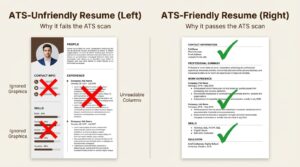
The Problem: The ATS reads a resume like a simple text document, from top to bottom and left to right. When it encounters a two-column layout, it may try to read straight across, combining text from both columns and making it incoherent. That carefully crafted experience section could become nonsensical to the software.
Why it Fails:
This is a well-documented issue. One Reddit user tested this by feeding a Canva resume to ChatGPT, and the AI could only read the headline. If an advanced AI struggles with this format, a standard ATS parser is also likely to fail. Here’s what trips them up:
- Graphic elements: Slick icons for your phone and email or progress bars for skills are often ignored by the ATS, and any text inside those elements may be lost.
- Columns and tables: As mentioned, these are a primary cause of parsing errors. The text gets mixed up, making your skills and experience unreadable.
- Headers & Footers: It’s tempting to put your contact info in the header to save space, but many systems are programmed to ignore headers and footers. Your name and email might as well be invisible.
- Non-standard fonts: A fancy script font might look elegant, but if the ATS doesn’t recognize it, it could be converted into a string of random characters.
How to Fix It: Keep it simple. Use a clean, single-column format. Stick to standard, easy-to-read fonts like Arial, Calibri, Times New Roman, or Georgia. For bullet points, use the classic solid circle or square. Avoid arrows, checkmarks, or other non-standard symbols.
2. You’re missing the exact keywords recruiters search for
Think of the ATS as a recruiter’s personal search engine. When a recruiter needs a CA with experience in statutory audits, they don’t read every resume. They type “statutory audit” into the ATS search bar, and the system shows them the resumes that contain that exact phrase. If your resume isn’t optimized with the right keywords, you’re invisible.
The Problem: Your resume might be full of incredible experience, but if you’re not using the same language as the job description, the ATS won’t connect the dots. Recruiters overwhelmingly filter candidates by skills from the job description, so a mismatch is a guaranteed rejection.
Why it Fails:
As a Chartered Accountant, you might use internal company jargon or describe your work in broad terms. For instance, you might write that you “ensured the company followed all relevant rules.” But if the job description specifically asks for “Statutory Compliance” or “Regulatory Reporting,” the ATS isn’t programmed to know you’re talking about the same thing. It’s looking for an exact match.
How to Fix It: This is the most important step: customize your resume for every single application. Read the job description carefully and pull out the key skills and qualifications. Then, weave those exact phrases into your professional summary and work experience sections. If the job description lists “IFRS,” make sure “IFRS” is on your resume. It’s also a good idea to include both the acronym and the full phrase, like “Generally Accepted Accounting Principles (GAAP),” to cover all bases.
- For Statutory Audit Roles: Don’t just say you did audits. Use specific terms like Internal Controls and Risk Assessment, Financial Reporting, SOX Compliance, Control Testing, and IFRS.
- For Tax Roles: Go beyond “helped with taxes.” Use specific keywords that recruiters are searching for, such as Tax Compliance and Corporate Tax, Direct and Indirect Taxation, Tax Planning, GST, and IRS Regulations.
3. Your resume’s file type is causing parsing errors
The classic PDF vs. Word doc debate is a huge source of anxiety for job seekers, and for good reason. Choosing the wrong one can get your application tossed out before it’s even read.
The Problem: You submit your beautifully designed resume as a PDF to lock in the formatting, but the recruiter’s ATS can’t read it. The file comes through as a blank page or a jumble of random symbols.
Why it Fails:
While most modern ATS platforms can handle PDFs just fine, there are two big exceptions. First, some older systems still struggle with PDF parsing and prefer Word documents. Second, and more importantly, not all PDFs are created equal. A resume made in a design program like Canva is often exported as an image-based, not text-based PDF. To an ATS, an image-based PDF is just a picture. It can’t read any of the text, so it discards the file.
How to Fix It: The safest bet is to always submit a text-based PDF. You can create one by saving your resume as a PDF directly from a word processor like Microsoft Word or Google Docs. This keeps your formatting nice for the human reader while ensuring the text is readable by the machine. The only exception is if the job application specifically asks for a .doc or .docx file. In that case, give them exactly what they ask for. Following instructions is the first test, after all.
4. Your contact details are hidden in headers and footers
This is one of those small, seemingly innocent mistakes that can have disastrous consequences for your job search. You craft the perfect resume, it passes the ATS scan, and the recruiter thinks you’re the perfect candidate. They go to call you for an interview, and they can’t find your phone number.
The Problem: To make their resume look clean and save precious page space, many candidates put their name, email, and phone number in the header section of the document.
Why it Fails:
As we covered earlier, many applicant tracking systems are programmed to skip headers and footers entirely. They are designed to pull information only from the main body of the document. So, when your resume goes through the system, it’s processed without any of your contact information attached. You could be the top-ranked candidate, but if the recruiter has no way to reach you, your application is a dead end.
How to Fix It: This is an easy one. Always put your contact information in the main body of the resume, right at the very top of the page. Include your full name, a professional email address, your phone number, and a link to your LinkedIn profile. Don’t get fancy with it; just list it out cleanly so both the robot and the human can find it instantly.
5. You’re listing duties, not quantifiable achievements
Take a look at your current resume. Under your work experience, do you have a list of things you were “responsible for”? Things like:
- “Responsible for reconciling accounts.”
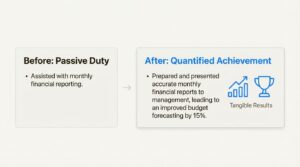
- “Assisted with monthly financial reporting.”
- “Managed client relationships.”
This tells a recruiter what your job was, but it doesn’t tell them if you were any good at it.
The Problem: A resume filled with job duties is passive. It doesn’t show your impact or the value you brought to your previous roles. Both the ATS and the human recruiter are looking for signs of achievement, not just a list of tasks.
Why it Fails:
Smarter ATS software can be programmed to look for action verbs, numbers, and metrics that signal a high-achieving candidate. A resume that just lists duties will get a lower relevancy score. And when it finally gets to a human, a list of duties is just plain boring. You want to show them what you accomplished, not just what you did.
How to Fix It: Go through every bullet point in your experience section and reframe it as a quantifiable achievement. The STAR method (Situation, Task, Action, Result) can be a helpful guide. Start with a strong action verb, describe what you did, and end with the positive result, using numbers to add context and scale.
Here’s how to transform those boring duties into powerful achievements:
- Before: “Managed accounts payable and receivable.”
- After (Quantified): “Managed a portfolio of 50+ client accounts, implementing a new invoicing system that reduced processing time by 30%.”
- Before: “Prepared monthly financial reports.”
- After (Quantified): “Prepared and presented accurate monthly financial reports to management, leading to an improved budget forecasting by 15%.”
- Before: “Assisted with tax preparation.”
- After (Quantified): “Assisted in preparing 50+ corporate tax filings, identifying key deductions that resulted in an average tax saving of 12% per client.”

An infographic showing how to transform a passive duty into a quantified achievement on a CA resume for a better ATS score
Bonus tips for a high-scoring ATS check
- Use standard section headings: Don’t get creative with titles like “My Professional Journey.” The ATS is looking for standard headings. Stick to the classics: “Professional Experience,” “Education,” “Skills,” and “Certifications.”
- Tailor for every single application: We said it before, but it’s worth repeating. It might feel tedious, but spending 10 minutes tweaking your resume to mirror the keywords in each job description is the single most effective thing you can do to get more interviews.
- Avoid special characters: Stick to standard bullet points (like a solid circle or a simple square). Fancy arrows, checkmarks, or other symbols can turn into garbled text and cause errors.
- Don’t overstuff with keywords: While keywords are important, don’t just dump a list of them at the bottom of your resume. This practice, known as keyword stuffing, will get flagged by the ATS and looks terrible to a human reader. Weave the keywords naturally into your achievement-based bullet points.
For a deeper dive into crafting the perfect resume, including tips on using AI tools effectively, check out this helpful video guide. It provides a step-by-step walkthrough that complements the strategies we’ve discussed.
Verify if your resume is ATS-friendly
Getting your resume past the ATS isn’t about having the most beautiful design. It’s about clarity, strategy, and speaking the robot’s language. By avoiding complex formatting, tailoring your keywords, using the right file type, placing your contact details correctly, and quantifying your achievements, you can dramatically increase your chances of landing in the “yes” pile.
To ensure your resume is compliant, you can use an online tool for verification. The CA Monk Resume Builder uses AI to analyze your resume just like a real ATS would. You can upload it and get an instant score, along with detailed feedback on what a recruiter’s software is actually seeing.
Don’t let a simple formatting error or a missing keyword stand between you and your dream articleship or job. This can help you fix potential issues before you apply.
Also read: CA Industrial Training vs. Big 4 Articleship: Stipend Reality Check & Career Impact
Frequently Asked Questions
Q.1 What is the best format for a CA resume for an ATS?
A: The best format is a clean, single-column layout using standard fonts like Arial or Calibri. Avoid tables, graphics, and columns, as these can confuse the Applicant Tracking System. Always save and submit it as a text-based PDF unless a .docx file is specifically requested.
Q.2 How can I add keywords to my CA resume naturally?
A: The key is to weave keywords from the job description naturally into your work experience section. Instead of just listing them, use them in bullet points that describe your achievements. For example, mention “Statutory Audit” when describing a project where you performed one.
Q.3 Why might an ATS miss my contact details?
A: Many Applicant Tracking Systems are programmed to ignore the header and footer sections of a document. If you place your contact information there to save space, the system will likely miss it. Always put your name, email, and phone number in the main body of the resume, right at the top.
Q.4 Should I use a Word document or a PDF for my resume?
A: A text-based PDF is safest. It preserves your formatting for human eyes while remaining readable for the software. Create it by saving directly from a word processor like Word or Google Docs. Only submit a Word document if the job application explicitly asks for it.
Q.5 How do I know if my resume will pass an ATS scan?
A: A simple test is to copy all the text from your resume and paste it into a plain text editor like Notepad. If the text appears clean and in a logical order, it’s a good sign. For a more thorough check, you can use an online tool like the CA Monk Resume Scorer, which simulates how an ATS would read your document.
Q.6 Can I use a Canva template for my resume?
A: It’s highly discouraged. Canva templates often use complex formatting like columns, text boxes, and graphic elements that are unreadable to most ATS. They can also be saved as image-based PDFs, which the system sees as a blank picture. Stick to simple templates created in a word processor.